 Français (France)
  Finnish (FI)
  English (United Kingdom)




To run Monte Carlo simulation we need to define the probability distribution and related parameters for each project task so the question arises - where do we get them?
If you have estimated and recorded task costs and durations for your previous projects, for example based on the WBS (work breakdown structure), you can use historical data to get your parameter estimates. The procedure is given below.
- Collect all similar tasks from your previous projects.
- Look at the data and group it into some meaningful cost and duration intervals. Decide first how many intervals would be appropriate for your data. Divide the overall range, which is the diffrence between minimum and maximum values, by the number of intervals to get the length for each cost and duration interval. So, if you decide to use 10 intervals and have a minimum cost of $1000 and maximum cost of $2000 in your data, your cost interval length would be ($2000 - $1000) / 10 = $100. Do the similar calculation for duration.
- For each cost and duration interval calculate the number of hits, i.e. how many individual values fall into that interval. MonteCrystal plan allows to read or set the task history and to show results with proper histograms.
- Plot the grouped data into a meaningful diagram, such as histogram, for example. Look at the shape of the histogram and try to identify the type of probability distribution it fits to: uniform, normal, triangular, beta-PERT and so on.
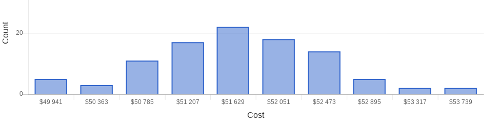
- If the appropriate distribution is one with a parameter for the most probable value, such as triangular of beta-PERT, identify the interval with most hits (i.e. mode) for both cost and duration. Use that as the parameter for most probable cost and duration respectively. Use the minimum and maximum cost and duration values as those parameters. If your distribution, such as normal distribution, is characterized by the mean and standard deviation, use the average from your data as mean and calculate your standard deviation applying either the sample or the total population formula. MonteCrystal plan allows to fit the probability distribution with related parameters.
- Once you have identified the distribution and related parameters for each task, set them in your project modeling or simulation tool. Example below is given using the MonteCarloProject. With MonteCrystal plan you can set distribution and its parameters for the simulation.
- Define the number of simulation rounds and run the simulation in your tool. Finally view the results. Examples are again from MonteCarloProject.
Note that the accuracy of the parameters and therefore the reliability of the simulation depends on your sample size. If it is small you should consider increasing especially the values for your maximum cost and duration parameters by some meaningful factor to account for the inherent risk in your project.