 Français (France)
  Finnish (FI)
  English (United Kingdom)






Open project list by selecting 'Projects' from the 'Projects' main menu and click on the project name to open the project display. Scroll down and click on the 'Show tasklist' button (see picture 1) to see the task table showing project tasks. Click on the 'Edit' link for the chosen task to open task edit view. You can also click on the task name to open the task display and click on the 'Edit' link in that display.
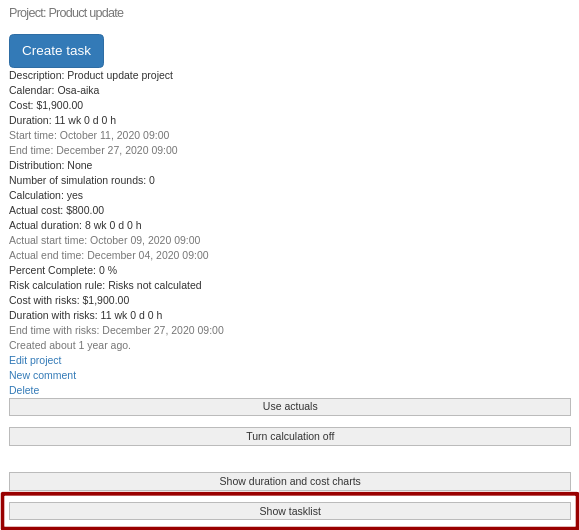
Picture 1. 'Show tasklist' button in project display.
Please note that a simulation plan is required for setting the calculation mode or probability distribution and its parameters and MonteCrystal plan is required for risk management and for using task history data in simulation.
Task edit form is otherwise similar to task creation form, but now you can also define percent complete information for the task.
Task edit form has following restrictions:
- Task hierarchy (relationships between parent and sub tasks) cannot be defined. Instead it is defined in the task display.
- If task has subtasks, following restrictions apply:
- Task costs or percent complete information cannot be given. They are instead calculated based on sub tasks' data.
- Task planned and actual start times and durations cannot be given if project calculation is turned on. In that case also start times and durations are calculated based on sub tasks' data.
- Risk calculation rule cannot be set (MonteCrystal plan is required for risk management).
- If calculation is on for the project and task has predecessors and task calculation mode is set to 'Automatic', planned start times are calculated based on predecessors' planned end times instead of setting them manually. However, if you turn calculation off or use another calculation mode for the task, you can set these times manually. Following calculation modes are available:
- Automatic:task planned start time is set equal to the maximum of predecessors' planned end times
- Flexible:task planned start time cannot be earlier than the maximum of predecessors' planned end times
- Manual: task planned start time is set manually
- Percent complete cannot be set for tasks with zero duration
Project calculation is turned on and off in the project display.
Users with simulation plan can also give remaining duration for the task. If remaining duration is not given, it is calculated based on duration and percent complete information. For example, if task duration is 10 weeks, it is 50% complete and user does not specify the remaining duration, it will be set as 5 weeks.
If remaining duration is given, duration is calculated based on remaining duration and percent complete information. For example, if task duration is 10 weeks, it is 50% complete and user has set the remaining duration as 6 weeks, task duration will be set as 11 weeks.
Users with MonteCrystal plan can set the risk calculation rule, which determines how risk affected cost and duration are calculated for the task. Following options are available:
- 'Risks not calculated'. Risks do not affect task cost or duration.
- 'Expected value of risks'. Expected values of assigned risks' cost and duration are added to planned cost and duration.
- 'All risks'. Assigned risks' cost and duration impacts are added as such to planned cost and duration. Probabilities are not considered.